

 Secure payments
Standard refund policy
Trade Assurance
Secure payments
Standard refund policy
Trade Assurance
| Product Type | Memory Module |
|---|---|
| Compliance Standards | RoHS |
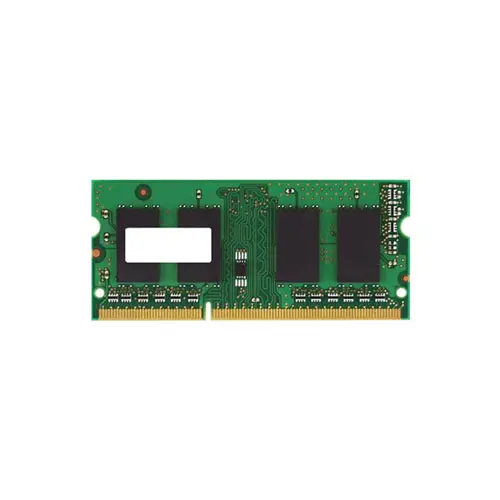
| Memory Capacity | 2 GB |
| Memory Technology | DDR3 |
| RAM Speed | 1333 |
| RAM Standard | DDR3-1333/PC3-10600 |
| Signal Type | Unbuffered |
| Column Access Strobe (CAS) | CL9 |
| Rank | Dual Rank x8 |
| Quantity of Pins | 204-pin |
| RAM Genre | SoDIMM |
This unbuffered DDR3-1333 SoDIMM in a dual-rank x8 configuration delivers stable, low-latency operation at CL9, making it a reliable plug-and-play upgrade for mobile workstations and older notebooks that require consistent multitasking performance. Its 204-pin form factor ensures broad compatibility across legacy platforms, while the dual-rank organization improves memory interleaving and bandwidth efficiency under sustained workloads with minimal power overhead.
1. SoDIMM form factor with 204-pin layout ensures effortless plug-and-play installation, perfect for quick laptop memory upgrades.
2. DDR3 technology strikes an optimal balance between speed and low voltage operation, helping to preserve battery life during mobile use.
3. 2 GB capacity provides enough headroom for everyday multitasking and smooth web browsing on entry-level laptops.
4. 1333 MHz clock speed delivers reliable data transfer rates that keep productivity applications responsive without excessive power draw.
5. CL9 latency offers a fine-tuned response time, reducing delays in application launches and improving overall system feel on the go.
The Micron MT18KSF25672HZ-1G4G1 is a 2GB DDR3-1333 SODIMM purpose-built for notebooks and small-form-factor mobile workstations, and its four key attributes directly address the real frustrations of portable computing. The 204-pin SODIMM form factor means this unbuffered module slots flawlessly into today’s slim ultrabooks, transforming a sluggish system into a responsive tool without wrestling with bulky components—truly an effortless upgrade even for users with just a single access panel. When you are analyzing large spreadsheets on a mobile workstation or juggling multiple browser tabs during research, the dual-rank x8 organization interleaves memory banks to sustain higher bandwidth, preventing the stuttering that kills productivity. Combined with a true CL9 latency and 1333MT/s throughput, every application launch and in-app operation feels instantaneous, which is critical when you are presenting live data in a client meeting and cannot afford hesitation. Moreover, DDR3’s mature power profile helps extend battery life, so that lightweight notebook stays alive through back-to-back flights. This module does not just meet a spec sheet—it rescues your daily workflow from constant, time-wasting waits.
This module is laptop memory, identified by its 204‑pin unbuffered DDR3 SoDIMM form factor. Capacity planning advice for three common laptop scenarios follows.
Laptop Upgrade
If a laptop has a single 2 GB module, adding an identical second stick creates a 4 GB dual‑channel configuration that noticeably improves multitasking and boot times. For a more substantial boost, replace both with 4 GB modules (8 GB total) to comfortably run modern operating systems and browsers.
Mobile Workstation
Professional applications like CAD, large datasets or local virtual machines demand as much RAM as possible. Most DDR3‑era mobile workstations support up to 16 GB across two slots; populate them with a matched pair of 8 GB DDR3‑1333 CL9 SoDIMMs to avoid paging and keep workflows smooth.
Ultrabook Power Saving
Standard 1.5 V DDR3 drains batteries faster in slim designs. Switching to a low‑voltage DDR3L‑1333 module (1.35 V) of 4 GB or 8 GB extends runtime without a performance penalty. A single 8 GB DDR3L SoDIMM balances power efficiency and sufficient memory for office productivity on the go.
Always verify the notebook’s maximum supported capacity and voltage before upgrading.
Rigorously tested DDR3 SODIMM for laptops; compatible with Dell Latitude E6430, HP EliteBook 8470p, Lenovo ThinkPad T430.
Q: Can I mix this MT18KSF25672HZ-1G4G1 with other memory modules of different brands or speeds?
A: Mixing is possible but not recommended. The system will default to the slowest speed and timings. Mismatched modules may cause stability issues, especially in dual-channel configurations. For best results, use identical modules.
Q: Is this memory compatible with my laptop?
A: This is a 204-pin DDR3-1333 SoDIMM for notebooks. Compatibility depends on your laptop’s specific generation (e.g., Intel HM55/QM57 chipset or AMD A-series). Verify your system supports DDR3, 1333MHz, and 2GB capacity.
Q: What is the recommended DIMM population order for optimal performance?
A: For laptops with two slots, populate both with matching capacities to enable dual-channel mode. If only one slot is used, install the module in the primary slot. Consult your service manual for slot identification.
Q: Does this module support overclocking or XMP profiles?
A: No, this is a standard JEDEC-compliant SoDIMM without XMP support. It operates at fixed DDR3-1333 timings (CL9). Overclocking on laptops is typically locked by the BIOS and not recommended due to thermal constraints.
Q: What warranty and typical failure rate can I expect?
A: This module includes a 1-year warranty. Typical annualized failure rate (AFR) for DDR3 SoDIMMs is below 0.5% under normal operating conditions. Proper handling and ESD precautions are essential to avoid early-life failures.