

 Secure payments
Standard refund policy
Trade Assurance
Secure payments
Standard refund policy
Trade Assurance
| Product Type | Memory Module |
|---|---|
| Compliance Standards | RoHS |
| Memory Capacity | 2 GB |
| Memory Technology | DDR3 |
| RAM Speed | 1600 |
| RAM Standard | DDR3-1600/PC3-12800 |
| Error Identifying | Non-ECC |
| Signal Type | Unbuffered |
| Column Access Strobe (CAS) | CL11 |
| Rank | Single Rank x16 |
| Quantity of Pins | 204-pin |
| RAM Genre | SoDIMM |
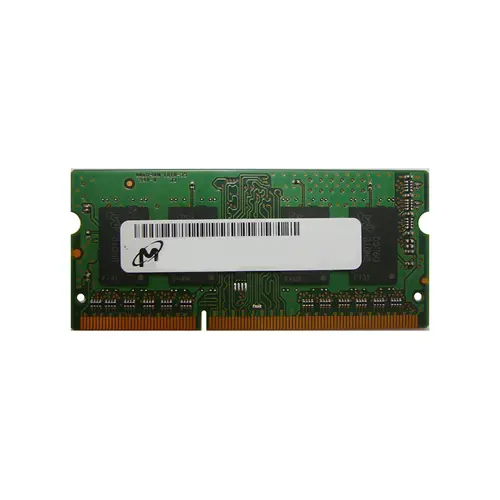
This unbuffered Non-ECC DDR3-1600 SoDIMM is best suited for upgrading older notebooks or mobile workstations that require a reliable, plug-and-play memory expansion. Its single-rank x16 configuration and CL11 latency ensure stable, low-power operation while maintaining broad compatibility with legacy systems.
1. A modest capacity keeps legacy laptops functional for essential browsing and document editing without unnecessary cost.
2. DDR3 technology delivers a substantial power efficiency improvement over earlier generations, helping older notebooks run cooler and extend battery life.
3. 1600 MT/s data rate provides ample bandwidth for smooth everyday computing, from cloud-based apps to media streaming, without holding back the CPU.
4. The compact SoDIMM form factor guarantees effortless drop-in installation during field upgrades, requiring no special tools or technical expertise.
5. CL11 latency keeps the system snappy and responsive, minimizing frustrating delays when switching between lightweight applications on a budget-friendly laptop.
The Micron MT4KTF25664HZ-1G6P2 is unmistakably a notebook memory module, engineered in the 204-pin SODIMM form factor that slips perfectly into the tight confines of any laptop, from a slim ultrabook to a field-ready mobile workstation. Its unbuffered, Non-ECC architecture eliminates the power-hungry register chips found on server DIMMs, which directly preserves precious battery life and reduces standby heat while keeping signal paths short for crisp, low-latency command response. Running at a true DDR3-1600 speed with CAS 11 timings, it pushes 12.8 GB/s of bandwidth without forcing the memory controller into unstable overclock territory—a critical balancer for thermally constrained thin-and-light designs. The single-rank x16 organization further lightens the electrical load, improving compatibility with older chipsets and extending idle battery runtime. For a student reviving a sluggish Dell Latitude that chokes on modern browsers and video conferencing, or a traveling engineer upgrading a Lenovo ThinkPad to handle large spreadsheets and diagnostic tools, this drop-in module transforms daily frustration into smooth multitasking reality. It means less time staring at a spinning cursor, more confidence in system stability, and a cost-effective way to make an aging portable feel responsive and reliable again.
Laptop Upgrade
For aging notebooks with a single 2GB DDR3 SoDIMM, upgrading to a dual‑module configuration dramatically boosts responsiveness. Replacing the original module with a matched pair of 4GB or 8GB sticks (8GB–16GB total) enables dual‑channel operation, reducing operating system and application lag. Always verify the chipset’s maximum supported capacity per slot before purchasing larger DIMMs.
Mobile Workstation
Professional workloads like CAD, 3D rendering, or data analysis thrive on maximized RAM capacity—often 16GB or 32GB across two slots. Populating both SoDIMM sockets with high‑density modules eliminates swap‑file thrashing, maintaining smooth performance under sustained load. Confirm that the workstation‑class chipset can address the intended total memory before migrating.
Ultrabook Power Saving
In thin‑and‑light designs, upgrading to low‑voltage DDR3L SoDIMMs (1.35V) reduces thermal output and extends battery runtime compared to standard 1.5V parts. A single higher‑capacity low‑voltage module can preserve an empty slot for future expansion while lowering idle power draw. Pairing identical low‑voltage DIMMs retains dual‑channel bandwidth without sacrificing energy efficiency.
Rigorously tested, this SO-DIMM is compatible with laptops like Dell Latitude, Lenovo ThinkPad, and HP EliteBook.
Q: Can I mix this MT4KTF25664HZ-1G6P2 with other memory modules of different brands or speeds?
A: Mixing is possible but not recommended. The system will default to the slower speed and looser timings, potentially causing instability. For optimal dual‑channel performance, install an identical DDR3‑1600 CL11 SoDIMM.
Q: Is this memory compatible with my system?
A: It fits notebooks with a 204‑pin DDR3 SoDIMM slot and chipsets that support 2 GB single‑rank modules. Verify your laptop uses standard 1.5 V or 1.35 V DDR3, not DDR2 or DDR4, before purchasing.
Q: What is the recommended DIMM population order for optimal performance?
A: Most laptops have two slots. Install this 2 GB module in the empty slot alongside a matching capacity and speed SoDIMM to enable symmetric dual‑channel mode. If replacing, populate the primary slot.
Q: Does this module support overclocking or XMP profiles?
A: No. This JEDEC‑compliant DDR3‑1600 module runs at its standard frequency and CL11 timing. It does not include XMP profiles and is not designed for overclocking in notebook platforms.
Q: What warranty and typical failure rate can I expect?
A: It is backed by a one‑year limited warranty. The typical annualized failure rate for Micron DRAM modules in normal operating conditions is well below 0.5%, ensuring high reliability.