

 Secure payments
Standard refund policy
Trade Assurance
Secure payments
Standard refund policy
Trade Assurance
| Product Type | Memory Module |
|---|---|
| Compliance Standards | RoHS |
| Memory Capacity | 8 GB |
| Memory Technology | DDR3 |
| RAM Speed | 1600MHz |
| RAM Standard | DDR3-1600/PC3-12800 |
| Error Identifying | Non-ECC |
| Signal Type | Unbuffered |
| Column Access Strobe (CAS) | CL11 |
| Rank | Dual Rank x8 |
| Quantity of Pins | 240-pin |
| RAM Genre | UDIMM |
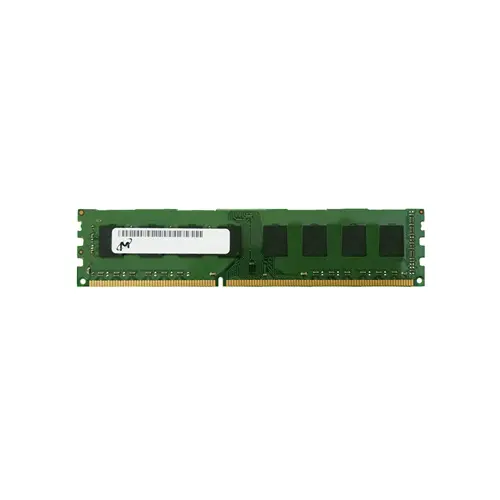
This unbuffered, non-ECC DDR3 UDIMM is optimized for desktop platforms, delivering reliable performance for gaming, content creation, and general productivity workloads. Its dual-rank x8 organization enhances memory interleaving for higher effective bandwidth, while the CL11 latency at 1600MHz ensures stable and responsive operation in compatible systems.
1. 8 GB capacity gives a desktop enough workspace to keep multiple browser tabs, communication apps, and a media player running simultaneously without resorting to sluggish disk swapping.
2. 1600MHz clock speed feeds older quad-core processors with steady bandwidth, helping avoid stutter in legacy game titles and shortening wait times during high-resolution photo batch exports.
3. CL11 timing delivers responsive cursor-to-action feedback in daily desktop tasks and quickens application cold starts, contributing to an overall snappy user experience.
4. Dual Rank x8 organization increases per-channel utilization through rank interleaving, which can lift minimum frame rates in memory-sensitive games and smooth out timeline scrubbing in video editing software.
5. Non-ECC unbuffered signaling strips away error-correction overhead, lowering access latency for unconstrained gaming sessions where absolute speed counts more than server-grade data protection.
For desktop power users, the Micron MT16KTF1G64AZ-1G6E1 8GB DDR3 UDIMM isn’t just a spec sheet—it’s a targeted upgrade that directly tackles sluggish real-world performance. As a non-ECC, unbuffered module, this memory strips away the error-correction and signal-registration delays inherent in server RAM, delivering the bare-metal low-latency response that competitive gamers need when every millisecond counts in a fast-paced AAA title. Its 1600MHz clock speed, paired with a CL11 CAS latency, ensures that the CPU isn’t left waiting for texture data, keeping frame times smooth during split-second firefights. For content creators, the dual-rank x8 organization activates interleaving on the memory bus, meaning Adobe Premiere Pro or DaVinci Resolve can simultaneously read from one rank while writing to another. This speeds up timeline scrubbing and reduces render stuttering during 4K video exports, turning what would be a bottlenecked wait into a fluid, uninterrupted workflow. In a 240-pin desktop form factor, this module plugs directly into mainstream boards to make system responsiveness tangibly faster, without the complexity or cost of buffered alternatives.
Based on the given specifications—8GB DDR3-1600 UDIMM, non-ECC, unbuffered, dual-rank x8, 240-pin—this module is primarily designed for desktop or laptop platforms (not servers, due to the lack of ECC and buffering). Below is the capacity planning guidance for typical usage scenarios.
Gaming Build
For a dual-channel configuration, pair two identical 8GB modules for 16GB total, which remains adequate for most AAA titles at 1080p when paired with a capable GPU. Budget-conscious builders can start with a single 8GB stick and add a matching second module later, ensuring identical speed and rank to avoid compatibility issues. Avoid using a single 8GB DIMM alone, as the lack of dual-channel bandwidth will significantly hamper minimum frame rates.
Content Creation
Serious video editing or 3D rendering on a DDR3 platform demands maximum capacity, ideally a 4x8GB setup for 32GB (common for older X79/X99 motherboards) or 2x8GB for a minimal 16GB scratch disk. If your board supports 32GB via four slots, populate all four with these 8GB dual-rank modules to reach 32GB, leveraging the higher rank interleaving for a slight throughput gain. For 64GB aspirations, you would need 8GB modules in an 8-slot board, which is rare on consumer DDR3 platforms—consider stepping to 16GB DIMMs if the chipset permits.
General Productivity
A single 8GB module is the cost-effective sweet spot for office suites, web browsing, and video conferencing on Windows 10/11. Users who multitask heavily with dozens of browser tabs and lightweight applications should opt for 2x8GB (16GB) to prevent swapping to slow HDDs, delivering responsive performance at minimal additional cost. There is no need to populate more than two slots for typical productivity workloads.
Laptop Upgrade
Many DDR3-era laptops shipped with a single 4GB or 8GB module; replacing it with this 8GB stick or adding a second identical 8GB module (if a slot is free) instantly doubles capacity to 8GB or 16GB. Before purchase, verify that the laptop supports 1.5V DDR3 and has a free SO-DIMM slot (or be prepared to replace the existing module). A 2x8GB kit is the best way to ensure dual-channel operation, but mixing this module with an existing compatible 8GB stick from a different vendor is usually acceptable if timings match.
Mobile Workstation
For older mobile workstations running CAD, GIS, or virtual machines, maximize capacity with 2x8GB (16GB) or, if the chipset allows, 2x16GB kits (though this specific part number is 8GB, so use two of these for 16GB). 16GB is the practical limit for many 4th-gen Intel mobile platforms; check your model’s maximum supported RAM. When running memory-intensive professional software, dual-channel operation is essential—always install identical pairs.
Ultrabook Power Saving
Note that this module is a standard 1.5V DDR3 UDIMM, not low-voltage DDR3L (1.35V). In Ultrabooks that strictly require DDR3L for power efficiency and thermal constraints, using this 1.5V module may prevent booting or increase battery drain. If your Ultrabook explicitly supports dual-voltage operation, a single 8GB module can provide a capacity upgrade with only a minor impact on runtime; however, always prefer DDR3L parts for maximum battery life. For lightweight tasks, a single 8GB module reduces power consumption versus two smaller sticks by keeping one memory channel idle.
Proven compatible after rigorous testing: Dell OptiPlex 7010, HP EliteDesk 800 G1, Lenovo ThinkCentre M93p.
Q: Can I mix this MT16KTF1G64AZ-1G6E1 with other memory modules of different brands or speeds?
A: Mixing different brands or speeds is not recommended. The system will default to the slowest module’s speed and timings, which often causes instability. For reliable operation, install identical modules.
Q: Is this memory compatible with my system?
A: This 8GB DDR3-1600 UDIMM requires a desktop motherboard with DDR3 DIMM slots and chipsets such as Intel 6/7/8 Series or AMD 900 Series. Verify 240-pin non-ECC support before purchasing.
Q: What is the recommended DIMM population order for optimal performance?
A: For optimal dual-channel performance, install matching pairs in the same-colored slots (e.g., slots 1 and 3 or 2 and 4) as indicated in your motherboard manual. Populate the furthest slot from CPU first if using a single module.
Q: Does this module support overclocking or XMP profiles?
A: No, this module runs at JEDEC standard DDR3-1600 CL11. It does not include XMP profiles and is not designed for overclocking. For higher frequencies, select a kit with explicit XMP support.
Q: What warranty and typical failure rate can I expect?
A: This memory comes with a standard 1-year warranty. The typical annualized failure rate is well below 0.5% when operated within specification. We recommend proper handling to maintain long-term reliability.