

 Secure payments
Standard refund policy
Trade Assurance
Secure payments
Standard refund policy
Trade Assurance
| Product Type | Memory Module |
|---|---|
| Compliance Standards | RoHS |
| Memory Capacity | 256 MB |
| Product Voltage | 3.3V |
| RAM Speed | 133MHz |
| Error Identifying | Non-ECC |
| Signal Type | Unbuffered |
| Column Access Strobe (CAS) | CL3 |
| Quantity of Pins | 168-pin |
| RAM Genre | UDIMM |
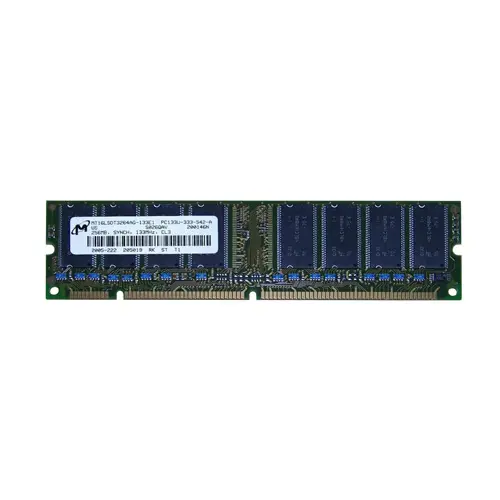
Ideal for retro desktop systems and legacy industrial PCs, this 256MB PC133 UDIMM provides a reliable upgrade for older productivity and classic gaming environments. Its unbuffered 3.3V design paired with a low CL3 CAS latency ensures responsive, low-latency data access on vintage platforms that demand precise signal integrity without ECC overhead.
1. A modest memory footprint comfortably supports essential multitasking and legacy productivity suites, keeping background tasks responsive without swap-file thrashing during everyday desktop use.
2. The synchronous memory clock sustains steady bandwidth delivery that minimizes frame-time inconsistencies, giving retro gamers fluid visuals without distracting hitches.
3. Tight column access timing dramatically cuts read latency, translating into snappier window switching and near-instant application launches for interruption-free workflows.
4. Unbuffered signaling eliminates on-module register lag, sharpening command execution for smoother timeline scrubbing in audio and light video editing projects.
5. The standard UDIMM form factor guarantees hassle-free physical compatibility with consumer desktop boards, streamlining do-it-yourself memory upgrades for mainstream users.
For your classic desktop build, the Micron MT16LSDT3264AG-133E1 UDIMM is not just a replacement part—it is the foundation of responsive, stutter-free computing where every nanosecond counts. As an unbuffered module, it allows the memory controller to talk directly to the DRAM chips without the added clock cycle of a register, dramatically reducing access latency. That direct line is reinforced by its true CL3 rating; at 133 MHz, a Column Access Strobe of just 3 cycles keeps data flowing to the CPU with minimal wait states, which means snappier level loads in period-correct 3D gaming rigs running titles like Unreal Tournament, and noticeably smoother timeline scrubbing when you are restoring a legacy Windows 2000 non-linear editing workstation. The strict 3.3V supply ensures clean signalling and thermal stability inside aging motherboards, preventing subtle timing errors that plague overclocked or heavily populated systems. By combining low-latency direct signalling with disciplined voltage and a proven 133 MHz frequency, this module turns frustrating micro-pauses into fluid, predictable performance whether you are fragging in a vintage LAN party or rendering a long-lost DV project.
Desktop Memory Capacity Planning for 256 MB PC133 SDRAM
Based on the 168-pin, 3.3V, Non-ECC, Unbuffered DIMM specification, this module is legacy desktop SDRAM. Given its extremely low density, capacity planning focuses on retro systems or extreme budget legacy builds.
Gaming Build
Modern gaming demands 16 GB or more, which is impossible with 256 MB modules. For a classic Windows 98/XP retro gaming rig, populate two slots with these modules to achieve 512 MB and enable chipset interleaving for slightly better bandwidth. Realistically, one module is enough for many period titles; seek larger-capacity contemporary memory for any modern build.
Content Creation
Even fully populating four DIMM slots only yields 1 GB, utterly insufficient for 64 GB video editing or 3D rendering workloads. A single module can outfit a vintage workstation for basic image editing under lightweight Linux, but any serious content creation requires a modern DDR4/DDR5 platform.
General Productivity
For a minimalist office PC running a lightweight OS or Windows XP, a single 256 MB module handles email, documents, and web browsing at low resolution. Adding a second module for a 512 MB total improves multitasking responsiveness. This configuration delivers extreme cost-effectiveness for repurposing older desktop hardware.
Rigorously tested, compatible with desktops like Dell OptiPlex GX200, HP Vectra VL400.
Q: Can I mix this MT16LSDT3264AG-133E1 with other memory modules of different brands or speeds?
A: Mixing is possible, but not recommended. The system will default to the slowest module’s speed (likely 133MHz) and loosest timings. Brand mismatches can risk instability on legacy chipsets.
Q: Is this memory compatible with my system?
A: It fits desktops with 168-pin SDRAM slots, typically Intel 440BX/810 or VIA Apollo Pro chipsets. Confirm your motherboard supports 3.3V, unbuffered, non-ECC, 256MB modules at 133MHz (PC133).
Q: What is the recommended DIMM population order for optimal performance?
A: Populate the slot closest to the CPU first. For dual-bank systems, install identical modules in separate banks. Consult your motherboard manual, as some chipsets require specific sequences for proper addressing.
Q: Does this module support overclocking or XMP profiles?
A: No. This 133MHz (PC133) SDRAM adheres to JEDEC standards and does not support XMP profiles or user-defined overclocking. The CL3 latency is fixed for stable operation.
Q: What warranty and typical failure rate can I expect?
A: This module carries a 1-year warranty. Failure rates are extremely low when installed in compatible systems within specified voltage (3.3V) and frequency. We ensure full testing prior to shipment.