

 Secure payments
Standard refund policy
Trade Assurance
Secure payments
Standard refund policy
Trade Assurance
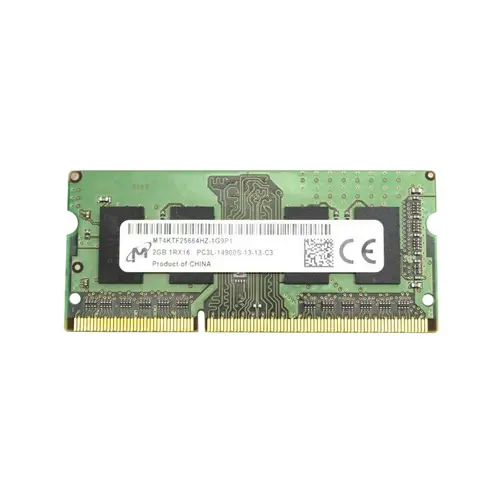
| Product Type | Memory Module |
|---|---|
| Compliance Standards | RoHS |
| Memory Capacity | 2 GB |
| Memory Technology | DDR3 |
| RAM Speed | 1866 |
| RAM Standard | DDR3-1866/PC3-14900 |
| Error Identifying | Non-ECC |
| Signal Type | Unbuffered |
| Column Access Strobe (CAS) | CL13 |
| Rank | Single Rank x16 |
| Quantity of Pins | 204-pin |
| RAM Genre | SoDIMM |
This DDR3-1866 SoDIMM is a dedicated notebook memory module tailored for mobile workstations and laptop upgrades, delivering a plug-and-play drop-in solution with a slim single-rank x16 configuration that reduces power draw and thermal footprint. Its tight CL13 latency at 1866 MHz ensures responsive multitasking and low-energy operation, making it an ideal choice for extending the life of compact portable systems.
1. DDR3 memory technology ensures wide compatibility with older notebook platforms, allowing a straightforward, drop-in upgrade that revives aging laptops without the need for new system investments.
2. SoDIMM form factor slots directly into compact notebook chassis, making the install process tool-free and instant for mainstream ultrabook and small-form-factor designs.
3. Unbuffered signal type draws less idle power from the battery than registered alternatives, helping extend mobile runtime during light office tasks and web browsing.
4. A capacity of 2 GB handles essential operating system tasks and light productivity applications, delivering a cost-effective path to basic multitasking on legacy portable systems.
5. CAS 13 latency tightens the gap between request and response, so everyday navigation and application launches feel more responsive on a modest notebook configuration.
Judging by its 204-pin SODIMM form factor and non-ECC unbuffered architecture, the Micron MT4KTF25664HZ-1G9P1 is a notebook memory module purpose-built for mobile platforms. For the road warrior or the home user reviving an aging ultrabook, its four defining characteristics solve real-world pain points. The non-ECC, unbuffered design eliminates the extra handshaking cycles that server memory demands, so your laptop stays lean and responsive during heavy multitasking, rather than introducing latency when you are flipping between video calls and large presentations. That pairing of DDR3-1866 speed with a CL13 latency turns into tangible snappiness: on a thin-and-light business notebook struggling with sluggish application launches, this module cuts load times and makes streaming and document editing fluid again. The single-rank x16 configuration ensures broad compatibility across a wide range of laptop chipsets, preventing the frustrating BIOS recognition failures often seen when upgrading older mobile workstations that rely on a single accessible SODIMM slot. Finally, the compact SODIMM footprint turns an upgrade into a tool-free, two-minute procedure, giving you an immediate capacity and responsiveness lift whether you are updating a travel-friendly notebook or a home media laptop. It is a targeted upgrade that respects battery runtime and real-world mobile needs.
Laptop Upgrade
For systems originally equipped with a single 2 GB DDR3-1866 SO-DIMM, the most cost‑effective upgrade is to add a second identical module to enable dual‑channel mode and reach 4 GB total. If the workload involves web browsing, office applications, and video streaming, a pair of 4 GB modules (8 GB total) offers a more comfortable multitasking experience. Always verify whether the chipset supports 1866 MT/s and whether the available slot accepts a double‑sided module if a higher‑capacity stick is used.
Mobile Workstation
Memory‑hungry professional applications like CAD, 3D rendering suites, or large dataset analysis benefit from maximum capacity. Most mobile workstations of the DDR3 generation support up to 16 GB (2 × 8 GB) or 32 GB (2 × 16 GB) SO‑DIMMs. Populating both slots with the highest‑qualified density reduces swapping and accelerates project loading. Use matched pairs of unbuffered Non‑ECC DDR3‑1866 with low CL ratings to maintain both capacity and speed, and confirm that the BIOS supports the desired module density.
Ultrabook Power Saving
Although the base specification is standard‑voltage DDR3, many ultrabooks require DDR3L (1.35 V) modules for stable operation and extended battery life. When upgrading an ultrabook, select low‑voltage SO‑DIMMs such as a dual‑channel 8 GB (2 × 4 GB) DDR3L‑1866 kit. The lower operating voltage reduces power draw and heat output, directly contributing to longer runtimes during light productivity and media consumption. Always cross‑reference the manufacturer’s qualified vendor list to ensure proper low‑voltage support before purchase.
Rigorously tested, compatible with laptops like Lenovo ThinkPad T430, Dell Latitude E6430, HP EliteBook 8470p.
Q: Can I mix this MT4KTF25664HZ-1G9P1 with other memory modules of different brands or speeds?
A: Mixing brands or speeds is possible but not advised. The system will default to the slowest module's speed, and variance in timings may cause stability issues. For best dual-channel reliability, use identical modules.
Q: Is this memory compatible with my system?
A: This 204-pin DDR3-1866 SODIMM suits laptops with Intel 3rd/4th Gen Core or AMD platforms supporting DDR3-1866/PC3-14900. Verify your laptop accepts DDR3 SODIMMs and this speed; consult your model's specifications.
Q: What is the recommended DIMM population order for optimal performance?
A: For dual-channel operation, populate both SODIMM slots with a matched pair. With a single module, either slot typically works, but check your laptop manual for the primary slot to ensure proper detection.
Q: Does this module support overclocking or XMP profiles?
A: No. It adheres to JEDEC standards and runs at its native DDR3-1866 CL13 without XMP. Overclocking is not supported and could void the warranty and system stability.
Q: What warranty and typical failure rate can I expect?
A: This module comes with a 1-year warranty. Quality DDR3 SODIMMs exhibit an annualized failure rate far below 0.5%, delivering excellent reliability under standard operating conditions.