

 Secure payments
Standard refund policy
Trade Assurance
Secure payments
Standard refund policy
Trade Assurance
| Product Type | Memory Module |
|---|---|
| Compliance Standards | CE,WEEE,RoHS |
| Memory Capacity | 4 GB |
| Memory Technology | DDR3 |
| RAM Speed | 1600 |
| RAM Standard | DDR3-1600/PC3-12800 |
| Error Identifying | Non-ECC |
| Signal Type | Unbuffered |
| Column Access Strobe (CAS) | CL11 |
| Rank | Dual Rank x8 |
| Quantity of Pins | 204-pin |
| RAM Genre | SoDIMM |
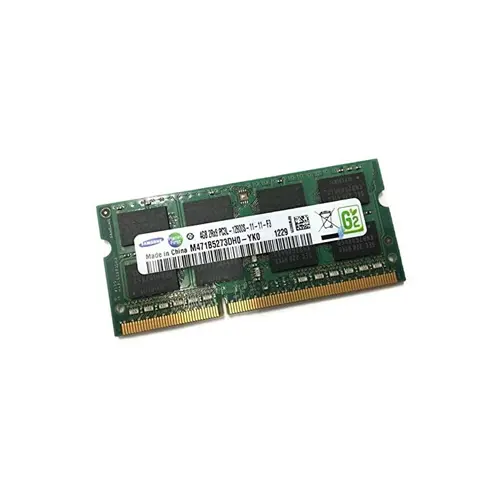
Designed as a non-ECC unbuffered SODIMM with a 204-pin form factor, this 4 GB DDR3-1600 module is optimized for notebook upgrades and mobile workstations requiring stable, low-power memory expansion. Its dual-rank x8 organization enhances data access interleaving for improved multitasking responsiveness, while the CL11 timing ensures reliable low-latency operation in thermally constrained portable systems.
1. The SoDIMM form factor allows a tool-free, drop-in upgrade that instantly revitalizes aging laptops without any chassis modifications.
2. A modest capacity handles everyday browsing and office suites smoothly, keeping power consumption low to prolong battery runtime.
3. DDR3 technology ensures broad compatibility with legacy notebook platforms, eliminating firmware risks during a straightforward memory refresh.
4. The mainstream speed grade delivers responsive application launches while staying within the thermal envelopes of slim, portable designs.
5. A standard notebook pin count guarantees a snug physical fit and stable signal integrity, making the installation practically foolproof.
The M471B5273DH0-YK0 is a notebook memory module, and its architecture is purpose-built for the constraints of mobile computing. Its Non-ECC, Unbuffered design eliminates the additional clock cycles and power draw of server-grade logic, directly extending battery runtime—an essential advantage when a mobile workstation is rendering a 3D model miles from the nearest outlet. The DDR3-1600 speed and Dual Rank x8 organization work in tandem to keep data flowing efficiently; Dual Rank interleaves access across two internal ranks, noticeably improving responsiveness when you are running a virtual machine alongside a dozen browser tabs, preventing the system from stuttering under concurrent loads. The compact 204-pin SODIMM form factor guarantees compatibility with space-constrained ultrabooks and barebone notebooks, while making a user-initiated upgrade trivial: snapping this module into a thin-and-light laptop instantly reverses the slowdown caused by memory-hungry collaboration tools. Finally, the moderate CL11 latency keeps voltages and thermals in check, protecting slim chassis from heat buildup during sustained use. For the field engineer needing reliable multitasking or the student upgrading a sluggish notebook, this memory translates directly into cooler, longer, and more predictable everyday performance.
Laptop Upgrade
When upgrading an older notebook that shipped with a single 4 GB SoDIMM, the most cost‑effective path is to add a second identical 4 GB module for a total of 8 GB. This populates both slots, enables dual‑channel mode, and significantly improves integrated graphics performance as well as overall system responsiveness. If the laptop currently has 4 GB and two slots are free, a 2×4 GB kit doubles capacity while keeping the investment minimal.
Mobile Workstation
For professional workloads like CAD, 3D rendering, or scientific analysis, maximise the platform’s supported capacity—typically 16 GB (2×8 GB) on older mobile workstations, and up to 32 GB on select high‑end models that accept 16 GB DDR3 SoDIMMs. Populate both channels with the largest matching modules to prevent memory pressure, reduce disk swapping, and keep large datasets fully resident in RAM for smooth multi‑application workflows.
Ultrabook Power Saving
This specific module follows the standard 1.5 V DDR3 specification, while many ultrabooks demand low‑voltage DDR3L (1.35 V) for thermal and battery‑life reasons. Before purchasing, verify the notebook’s voltage tolerance; using a 1.5 V DIMM in a DDR3L‑only slot can cause instability or prevent boot. If supported, a pair of low‑voltage 4 GB or 8 GB modules provides the best balance between energy efficiency, battery runtime, and dual‑channel performance for everyday productivity.
This Samsung DDR3 SoDIMM has been rigorously tested and is compatible with ThinkPad X230, T430, Latitude E6430, EliteBook 8470p.
Q: Can I mix this M471B5273DH0-YK0 with other memory modules of different brands or speeds?
A: Mixing brands or speeds is not advised for notebooks. This module’s DDR3-1600 timings and dual-rank design may conflict with dissimilar DIMMs, risking instability or no POST. Use identical modules for guaranteed compatibility.
Q: Is this memory compatible with my system?
A: Compatible with notebooks using 204-pin DDR3 SoDIMM slots, supporting non-ECC, unbuffered memory and 4GB dual-rank modules. Confirm your laptop chipset accepts DDR3-1600/PC3-12800 and a dual-rank x8 configuration.
Q: What is the recommended DIMM population order for optimal performance?
A: For single module, install into the primary slot (often slot 0). In dual-slot notebooks, populate both slots with matched pairs to enable dual-channel mode, which doubles memory bandwidth for improved system responsiveness.
Q: Does this module support overclocking or XMP profiles?
A: No. This JEDEC-standard DDR3-1600 module runs at fixed CL11 timings without XMP or overclocking support. It is designed for reliable, standard operation and long-term stability in notebook platforms.
Q: What warranty and typical failure rate can I expect?
A: This module includes a 1-year warranty. Under normal operating conditions, DRAM failure rates are extremely low, typically well under 0.5% annually, reflecting rigorous manufacturing and compliance with JEDEC reliability standards.