

 Secure payments
Standard refund policy
Trade Assurance
Secure payments
Standard refund policy
Trade Assurance
| Product Type | Memory Module |
|---|---|
| Compliance Standards | EU RoHS,FCC |
| Memory Capacity | 4 GB |
| Memory Technology | DDR3 |
| RAM Speed | 1600MHz |
| RAM Standard | DDR3-1600/PC3-12800 |
| Error Identifying | Non-ECC |
| Signal Type | Unbuffered |
| Column Access Strobe (CAS) | CL11 |
| Rank | Dual Rank x8 |
| Quantity of Pins | 240-pin |
| RAM Genre | UDIMM |
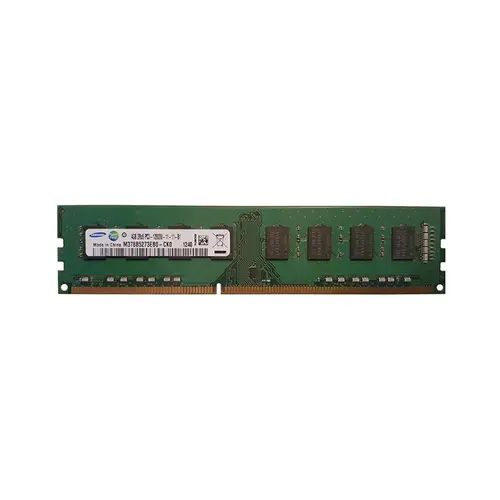
Designed as a non-ECC unbuffered UDIMM, this DDR3-1600 module is best suited for mainstream desktop platforms handling gaming, content creation, and productivity workloads. Its dual-rank x8 organization enables memory interleaving for improved bandwidth under concurrent access, while the CL11 timing delivers a practical balance between latency and clock speed on legacy systems.
1. UDIMM form factor guarantees seamless compatibility with standard desktop motherboards, enabling a hassle-free drop-in upgrade that revitalizes aging systems for everyday productivity.
2. High-speed DDR3 data transfers sustain responsive multitasking and help maintain consistent frame pacing in legacy gaming rigs, avoiding stutter during scene transitions.
3. CL11 latency tightens the gap between data requests and delivery, giving content creators and office users a perceptibly snappier workflow without frustrating lag.
4. Dual Rank x8 architecture leverages rank interleaving to parallelize memory accesses, effectively increasing throughput when juggling browser tabs, media playback, and background apps.
5. Non-ECC unbuffered signaling strips away error-correction circuitry overhead, resulting in lower access latency and a more cost-effective path to peak consumer desktop responsiveness.
Designed for desktop platforms, the M378B5273EB0-CK0 is a 4GB DDR3-1600 UDIMM that turns aging systems into responsive workhorses. Its non-ECC, unbuffered architecture eliminates the signal buffering overhead found in server memory, meaning every command travels directly from the CPU to the DRAM. In practical terms, you feel dramatically reduced input lag during fast-paced AAA battles and snappier timeline scrubbing when editing 4K video footage — the exact scenarios where buffered delays become unacceptable.
The module’s DDR3-1600 speed paired with a CL11 latency strikes a deliberate balance: a 1600MT/s transfer rate delivers 12.8GB/s of peak bandwidth that prevents frame drops in dense visual scenes, while the tight Column Access Strobe timing keeps initial data retrieval swift, directly improving software launch times and layer-heavy rendering tasks. Its dual-rank x8 organization interleaves accesses across two internal ranks, effectively parallelizing memory reads so that a complex Adobe Premiere project stays fluid during background exports. Finished in a 240-pin standard footprint with full EU RoHS and FCC compliance, this Samsung memory drops into legacy Intel or AMD systems with guaranteed electrical stability — no mysterious reboots during an hours-long render or competitive match. For the desktop user wrestling with a sluggish older build, this module delivers the low-latency, high-compatibility upgrade that restores real-world usability without replacing the entire machine.
Gaming Build
For a responsive gaming system, dual-channel operation is essential. Purchase a matching second 4 GB DDR3 UDIMM to form an 8 GB (2×4 GB) dual‑channel kit — the minimum for modern titles. If your board has four DIMM slots and you aim for 16 GB, install four identical modules to populate all channels and avoid mixing ranks or timings, though for AAA gaming consider upgrading to higher‑density 8 GB sticks.
Content Creation
Video editing, 3D rendering, and large photo composites thrive on high capacity. With 4 GB DIMMs, the practical ceiling is 16 GB using four matched modules, which falls short of the recommended 32–64 GB for complex scenes. Use a full pop of four 4 GB modules as a budget workstation starter and pair with a fast SSD scratch disk; move to 8 GB or 16 GB DIMMs for serious production.
General Productivity
Office suites, web apps, and multitasking run well on a cost‑effective 8 GB dual‑channel setup. Buy a second identical 4 GB UDIMM for 2×4 GB – it balances price and performance. If you later need more, fill the remaining two slots with another matched pair to reach 16 GB, giving a clear upgrade path without replacing existing memory.
Rigorously tested, this DDR3 UDIMM fits desktops like Dell OptiPlex 790 and HP Compaq 8200 Elite.
Q: Can I mix this M378B5273EB0-CK0 with other memory modules of different brands or speeds?
A: Mixing is possible, but the system will default to the slowest module's speed and timings, potentially causing instability. For guaranteed compatibility and peak performance, we recommend using identical modules.
Q: Is this memory compatible with my system?
A: This 240-pin DDR3 UDIMM is designed for desktop motherboards with non-ECC support. Verify your board's chipset (e.g., Intel 7-Series or AMD 900-Series) and CPU memory controller accept DDR3-1600 at 1.5V.
Q: What is the recommended DIMM population order for optimal performance?
A: For dual-channel operation, install identical modules into slots of the same color, typically starting with the channels farthest from the CPU. Always consult your motherboard manual for the precise population diagram.
Q: Does this module support overclocking or XMP profiles?
A: This module adheres to JEDEC standard DDR3-1600 profiles and does not feature XMP. While basic overclocking may be attempted, it is not guaranteed and could void warranty. Stable operation is assured at default settings.
Q: What warranty and typical failure rate can I expect?
A: This memory includes a 1-year warranty. The typical annualized failure rate for DDR3 UDIMMs is very low, generally under 0.5%. Proper installation and adequate system cooling further enhance long-term reliability.