

 Secure payments
Standard refund policy
Trade Assurance
Secure payments
Standard refund policy
Trade Assurance
| Product Type | Memory Module |
|---|---|
| Compliance Standards | EU RoHS,FCC |
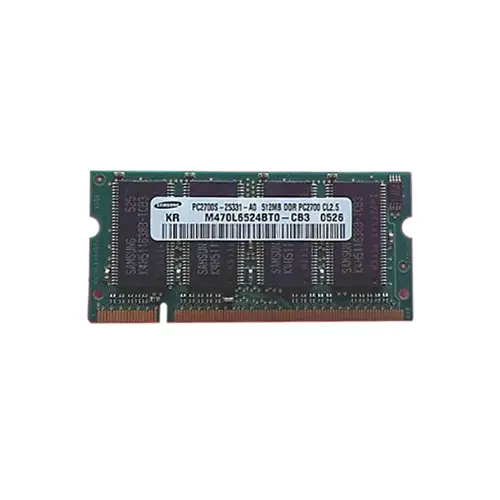
| Memory Capacity | 512 MB |
| Memory Technology | DDR |
| RAM Speed | 333 |
| RAM Standard | DDR-333/PC-2700 |
| Error Identifying | Non-ECC |
| Signal Type | Unbuffered |
| Column Access Strobe (CAS) | CL2.5 |
| Rank | Dual Rank x16 |
| Quantity of Pins | 200-pin |
| RAM Genre | SoDIMM |
This 512 MB DDR-333/PC-2700 SoDIMM is engineered for legacy notebook upgrades and thin-client mobile workstations, delivering low-latency CL2.5 operation and stable unbuffered signaling at 2.5 V to maximize battery runtime. Its dual-rank x16 organization ensures broad chipset compatibility and efficient memory interleaving for responsive multitasking in older laptop platforms.
1. The SoDIMM form factor guarantees effortless drop-in compatibility across mainstream laptop brands, turning a memory upgrade into a simple user-performed task without tools or technical support.
2. Ample capacity for its generation keeps essential office suites, browser tabs, and light creative tools simultaneously responsive, preventing the performance drain of constant disk swapping during mobile multitasking.
3. Swift synchronous clocking delivers brisk data throughput that removes stutter from video playback and accelerates everyday application launches, maintaining smooth productivity far from a desk outlet.
4. Aggressive column access latency tightens the gap between a command and data delivery, yielding the crisp, instant-on feel that makes document scrolling and window switching fluid on compact notebooks.
5. Non-ECC signaling eliminates redundant error-checking circuitry, directly reducing memory power consumption and internal heat buildup to extend battery runtime and preserve cool, quiet operation.
When you upgrade an aging notebook with the Samsung M470L6524BT0-CB3, you are not just adding capacity—you are removing the daily friction that turns a reliable machine into a frustration. This 512 MB DDR-333 SODIMM module directly addresses the core limitation of legacy mobile systems: sluggish multitasking caused by memory starvation. Its 200-pin small form factor and unbuffered, non-ECC design guarantee drop-in compatibility with countless thin-and-light laptops and mobile workstations from that era, making the upgrade process effortless even for non-technical users. The CL2.5 CAS latency translates into quicker data access for every single command, so your spreadsheet recalculation or database entry feels snappier rather than bogged down. Meanwhile, the dual-rank x16 organization interleaves memory banks to reduce wait states, which becomes palpable when switching between a heavy presentation and multiple browser tabs on a cramped desk. For the field engineer wrestling with CAD drawings on a vintage workstation or the student extending the life of a budget notebook, this memory restores responsive multitasking and buys critical extra months of productivity before a full system refresh is necessary.
Judging by the 200-pin DDR-333 (PC-2700) SoDIMM form factor, this is laptop memory. The following capacity planning recommendations assume a typical older-generation notebook platform.
Laptop Upgrade
A single 512 MB module is insufficient for modern operating systems. Replace the existing memory with a matched pair of 1 GB DDR-333 SoDIMMs to reach 2 GB total, enabling dual‑channel mode and markedly improving responsiveness in Windows XP or lightweight Linux environments. If the system has only one slot, a single 1 GB module is the maximum practical upgrade.
Mobile Workstation
For professional applications like CAD or data analysis on aging mobile workstations, install a pair of 1 GB modules—or, where chipset and BIOS permit, two 2 GB DDR‑333 SoDIMMs—to achieve 4 GB total. This maximizes addressable memory, reduces paging to the hard drive, and provides the stable capacity required for large datasets, though models with a 32‑bit OS will only utilize roughly 3.2 GB.
Ultrabook Power Saving
Legacy ultra‑portable notebooks benefit from low‑latency, low‑voltage variants, but standard DDR-333 at CL2.5 already offers decent power efficiency. A single 512 MB module draws less current than a pair, extending battery runtime for basic office tasks. When longer life is critical, stick to one module; for better multitasking, add a second identical 512 MB stick and activate dual‑channel to balance modest power increase with smoother performance.
Rigorously tested for laptops such as IBM ThinkPad T41, T42, and Dell Latitude D600.
Q: Can I mix this M470L6524BT0-CB3 with other memory modules of different brands or speeds?
A: Mixing is not recommended. This 200-pin DDR-333 SO-DIMM requires matched specifications to avoid instability. Differing speeds or brands may force the system to default to the slowest module, impacting performance.
Q: Is this memory compatible with my laptop?
A: It is a 200-pin PC-2700 (DDR-333) Non-ECC Unbuffered SO-DIMM. Please verify your laptop supports DDR1 200-pin SO-DIMMs and a 333MHz front-side bus. Check your chipset's maximum capacity as well.
Q: What is the recommended DIMM population order for optimal performance?
A: For single-channel DDR1 platforms, populate the primary slot first. Dual-channel support depends on your notebook chipset; if available, install matching pairs in slots of the same channel.
Q: Does this module support overclocking or XMP profiles?
A: No. This module adheres to JEDEC DDR-333 (CL2.5) standards only. There is no XMP profile or overclocking support, as it is designed for stable, compliant operation in legacy notebooks.
Q: What warranty and typical failure rate can I expect?
A: This module includes a 1-year warranty. Typical annualized failure rate (AFR) is below 0.5% under normal operating conditions, reflecting rigorous testing and adherence to EU RoHS and FCC standards.