

 Secure payments
Standard refund policy
Trade Assurance
Secure payments
Standard refund policy
Trade Assurance
| Product Type | Memory Module |
|---|---|
| Memory Capacity | 16 GB |
| Memory Technology | DDR4 |
| RAM Speed | 2400 MHz |
| RAM Standard | DDR4-2400/PC4-19200 |
| Signal Type | Unbuffered |
| Column Access Strobe (CAS) | CL17 |
| Rank | Dual Rank x8 |
| Quantity of Pins | 260-pin |
| RAM Genre | SoDIMM |
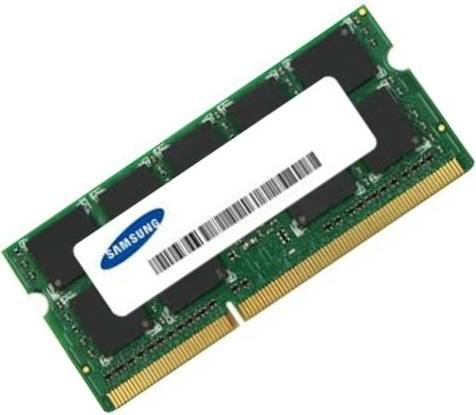
This 16 GB DDR4-2400 module is a 260-pin SO-DIMM designed for notebook and mobile workstation upgrades, delivering a cost-effective capacity boost for multitasking environments and portable productivity applications. Its dual-rank x8 organization increases internal bank interleaving efficiency for higher sustained throughput, while the unbuffered, low-voltage DDR4 operation ensures stable, plug-and-play compatibility and enhanced energy efficiency across a wide range of modern laptops.
1. The SoDIMM form factor guarantees a straightforward snap-in upgrade that fits virtually any modern laptop, making memory replacement effortless for non-technical users.
2. A 16GB capacity empowers professionals to keep dozens of browser tabs, office suites, and collaboration tools open simultaneously without ever touching the slower swap file.
3. DDR4 technology runs at a native low voltage that significantly reduces power draw and waste heat, directly extending battery endurance during long unplugged work sessions.
4. The 2400MT/s transfer speed delivers snappy program launches and fluid high-resolution content streaming, perfectly tuned for the thermal and power limits of thin-and-light notebooks.
5. Dual-rank x8 interleaving doubles the bank access parallelism, boosting integrated graphics bandwidth for noticeably smoother visuals in hardware-accelerated editing and casual gaming.
Designed specifically for modern notebooks, the Samsung M474A2K43BB1-CRC is a 16GB DDR4-2400 SODIMM that directly addresses the real constraints of mobile computing. Its 260‑pin form factor makes upgrading effortless, slipping into the tight chassis of ultrabooks and compact workstations where every millimeter counts. But the advantage runs deeper. This module operates at the efficient 1.2 V standard of DDR4, meaning your system draws less power during memory‑intensive tasks. For a professional editing video on location or a student running statistical models in a coffee shop, that translates into noticeably extended battery life and a cooler, quieter laptop—no throttling under sustained loads.
Inside that slim package, the dual‑rank x8 architecture shines when you need more than just capacity. In a mobile workstation running multiple virtual machines or containerized dev environments, dual rank supplies the interleaving bandwidth to keep concurrent tasks fluid, while the 16 GB headroom prevents the crippling swap‑file lag that destroys productivity. Even for a typical thin‑and‑light upgrade, the tight CL17 timing reduces latency during split‑second interactions like scrubbing through a complex CAD assembly or loading a large dataset into memory. And because it is an unbuffered design, there is no added signal delay—the memory responds instantly to the CPU’s requests, exactly what you need when every click must feel snappy. This module transforms a sluggish notebook into a reliable, go‑anywhere workhorse without compromising on endurance or ease of installation.
This is a notebook memory module: a 16GB DDR4-2400 Unbuffered SoDIMM (260-pin, dual-rank x8, CL17). Capacity planning for this laptop-class memory depends heavily on the target workload and physical slot constraints. The following configurations address typical scenarios with clear module counts and population rules.
Laptop Upgrade
For a mainstream laptop stuck with 8GB in a single slot, install this 16GB module directly to double capacity without replacing the existing stick—resulting in 24GB total. If your system has two slots and currently runs a single 8GB module, add another identical 16GB SoDIMM to reach 32GB dual-channel; this eliminates memory pressure during heavy multitasking and browser‑tab overload. Always match speed and rank to maintain dual‑channel symmetry wherever possible.
Mobile Workstation
Professional workloads like CAD, 3D modeling, and local VMs demand maximum capacity and bandwidth. Populate both SODIMM slots with these 16GB modules to achieve a dense 32GB dual‑channel configuration. Where the chipset supports it, you can even combine two 16GB modules now and upgrade later; the dual‑rank x8 design improves interleaving efficiency, lowering latency under sustained memory‑intensive operations.
Ultrabook Power Saving
Thin‑and‑light ultrabooks benefit from low‑voltage DDR4 memory (1.2 V) to extend battery runtime. Installing a single 16GB SoDIMM keeps power consumption minimal while providing ample headroom for office applications, streaming, and light creativity. Leave the second slot empty; this preserves upgrade flexibility and avoids the extra power draw of a fully populated dual‑channel layout—ideal for road warriors prioritizing endurance over peak throughput.
Strictly tested, works with Dell Latitude 7490, ThinkPad T480, EliteBook 840 G5.
Q: Can I mix this M474A2K43BB1-CRC with other memory modules of different brands or speeds?
A: Mixing modules may cause instability. For best results, install identical DDR4-2400 CL17 SoDIMMs. If mixed, the system typically defaults to the slowest speed and loosest timings.
Q: Is this memory compatible with my system?
A: This 260-pin DDR4 SoDIMM fits most laptops supporting DDR4-2400. Please check your laptop’s manual for 6th-gen Core or newer processor compatibility and SoDIMM slot availability.
Q: What is the recommended DIMM population order for optimal performance?
A: In dual-slot laptops, populate both slots with matched modules for dual-channel bandwidth. If only one module is installed, use any available slot; no specific order is required.
Q: Does this module support overclocking or XMP profiles?
A: No, this module uses standard JEDEC profiles for reliable plug-and-play operation. It does not support overclocking or Intel XMP, ensuring stability under factory timing specifications.
Q: What warranty and typical failure rate can I expect?
A: It comes with a one-year warranty. The typical annualized failure rate for this module is below 0.5%, reflecting high reliability in normal operating conditions.